
Inspection Questionnaires That Fit Your Ship
October 2026
Every internal audit and inspection in ZeeBORN is built around a questionnaire. In March we described the basics — structured chapters and topics with scoring, observations created from photos, and follow-up tasks with due dates and responsible roles (read the article). Since then, the questionnaire has become considerably more capable: in how it adapts to the actual vessel, how findings are highlighted, and where it can be filled in.
Repeatable Sections: One Template, Every Tank
Ships are not all the same. A tanker with eight cargo tanks and two slop tanks needs ten tank inspections; a bulk carrier needs one per hold. Instead of maintaining a separate questionnaire for every ship, a chapter can be defined once as a repeatable section. On board, the inspector simply adds one section per tank, hold, crane or lifeboat — each with its own answers, photos and findings, and each scored on its own.
Questions can also carry sub-questions, such as a main question on ballast water management with follow-up fields for the last sample date and certificate validity.
Findings at a Glance
- Flagged items highlight topics that need special attention. The report lists them on a dedicated overview page, together with the actions assigned to them.
- Previous inspection: the report can reference the last inspection of the vessel — selected from ZeeBORN or entered manually.
Three Ways to Work on a Questionnaire
The same questionnaire can be completed in three ways — whichever suits the situation:
- In the ZeeBORN desktop application — the full workspace in the office or on board.
- In the ZeeBORN web app — in any browser, on a laptop, tablet or phone: answer topics, add observations and attach photos, without installing anything.
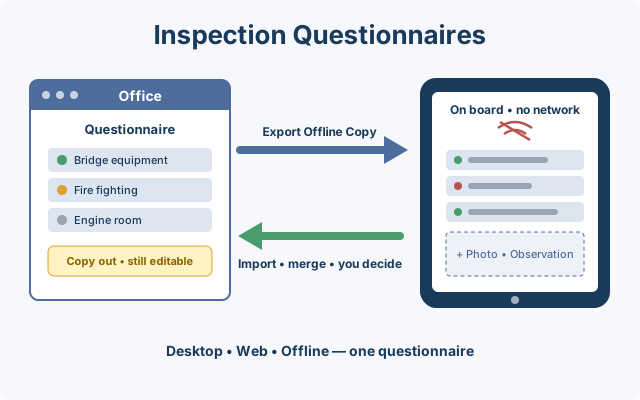
- Offline — as a single file that runs in any browser and needs neither an installation nor a connection.
When exporting an offline copy, you choose whether the questionnaire stays editable in the meantime (recommended) or is locked until the copy returns. If it stays editable, office and inspector keep working in parallel. On import, ZeeBORN merges both versions; where the same entry was changed on both sides, it shows both and asks which one to keep. Nothing is overwritten without you seeing it.
Questions about inspection questionnaires in ZeeBORN? Get in touch — we'd be happy to walk you through it.
Copyright 2026 ZeeBORN GmbH — www.zeeborn.net